
Self Check-in & Check-out
How employees mark their own attendance, and how it gets verified.
This is the everyday flow: open the app, tap check in when you arrive, tap check out when you leave. The interesting part is what happens in between.
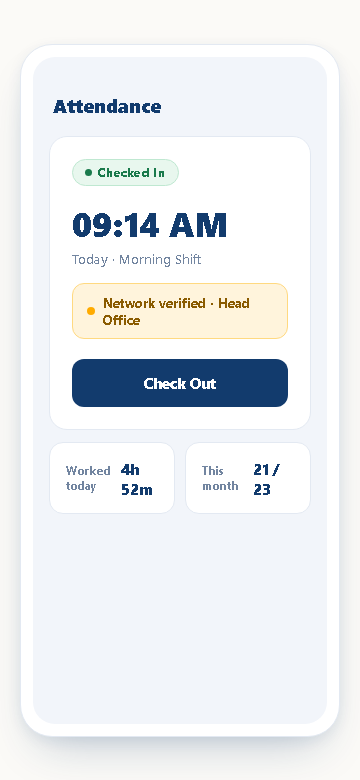
Checking in
From the Attendance tab, an employee sees one of three states at any time:
- Not started — no attendance recorded yet today
- Checked in — currently on the clock, with the check-in time shown
- Checked out — the day is closed out, with total duration shown
Tapping Check In immediately tries to verify the employee is on the office network. If a registered office computer (see Gate Devices & Office Verification) is reachable on the same local network, the check-in is marked network-verified and recorded instantly — no approval step, no waiting.
When network verification fails
If the phone can't reach an office network — most commonly because the employee is genuinely not at the office — Busiman doesn't just block the check-in. It routes them into the remote attendance flow instead: a short reason, and a manager reviews it.
Note: Network verification is checked independently for check-in and check-out. It's possible to check in on-site (verified) and check out later from somewhere else (remote, needs approval) — Busiman tracks each half separately rather than assuming the whole day was one way or the other.
Checking out
The same logic applies in reverse when the day ends. Checking out records the time and, combined with the check-in time, the total duration for the day. If checkout happens off the office network, that leg goes through the same remote-justification step.
What counts as "officially present"
A day only counts as officially present once every leg that needed approval has been approved. Network-verified legs count immediately; remote legs count once a manager signs off. This is what isOfficiallyPresent reflects in reports — it's not the same thing as "an app was tapped."
Next
If you're checking in from somewhere that isn't the office on purpose — client site, working from home, travelling — see Remote Attendance & Approvals.